
You’ve probably noticed how a clear, oversized display can make a huge difference in daily routines, especially when memory or vision isn’t what it used to be. The latest 2026 models combine bold seven‑inch screens, auto‑dimming, and up to 20 programmable alarms that can remind you of meds, appointments, or even the time after a power outage. With simple language switches and remote‑free operation, these devices aim to reduce confusion and keep you on schedule. Curious which ones actually deliver on those promises?
| Soobest Dementia Clock with 20 Alarms & Large Display |  | Dementia‑Focused | Display Size: 7‑inch | Resolution: 1024 × 600 HD | Alarm Capacity: Up to 20 alarms | CHECK ON AMAZON | Read Our Analysis |
| Soobest 12″ Digital Clock for Seniors | 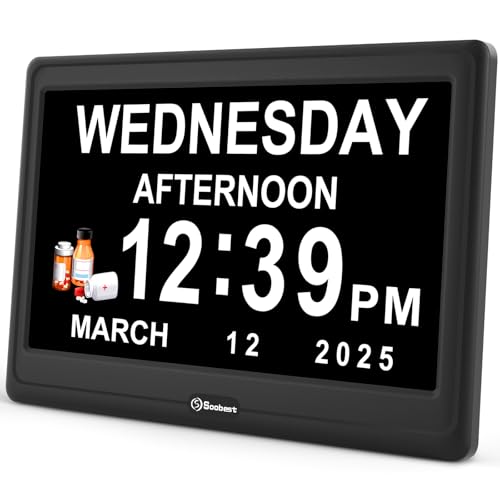 | Large‑Screen Pro | Display Size: 12‑inch | Resolution: 1024 × 600 HD | Alarm Capacity: Up to 20 alarms | CHECK ON AMAZON | Read Our Analysis |
| Digital Calendar Dementia Alarm Clock for Seniors (7in Black) |  | Versatile Reminder | Display Size: 7‑inch | Resolution: 1024 × 600 HD | Alarm Capacity: 12 alarms | CHECK ON AMAZON | Read Our Analysis |
| Digital Clock with Date Reminders Alarms Auto‑Dimming Remote Control |  | Remote‑Ready | Display Size: 7‑inch | Resolution: 1024 × 600 HD | Alarm Capacity: 6 alarms | CHECK ON AMAZON | Read Our Analysis |
| Elderly Day Clock with Large Display & 20 Alarms |  | Photo‑Friendly | Display Size: 7‑inch | Resolution: 1024 × 600 HD | Alarm Capacity: Up to 20 alarms | CHECK ON AMAZON | Read Our Analysis |
More Details on Our Top Picks
Soobest Dementia Clock with 20 Alarms & Large Display
Looking for a clock that truly supports seniors with memory loss or vision impairment? You’ll love the Soobest Dementia Clock. Its 7‑inch HD screen shows time, date, day and a six‑period calendar in crisp 1024 × 600 resolution. You can switch among white, yellow, analog or color‑background modes, and the auto‑brightness adjusts from level 1‑5 or auto. The device holds up to 20 alarms for meds, meals or showers, each marked with bright icons and voice ringtones. Power outages won’t erase settings thanks to its memory backup. It sits on a desk or mounts on a wall, weighing only 8.3 oz, making it ideal for any room.
- Display Size:7‑inch
- Resolution:1024 × 600 HD
- Alarm Capacity:Up to 20 alarms
- Brightness Control:Auto + 5 manual levels
- Language Support:Not specified (English default)
- Power Backup:Memory function (no battery backup)
- Additional Feature:4 display modes
- Additional Feature:Memory function after outage
- Additional Feature:Wall‑mountable design
Soobest 12″ Digital Clock for Seniors
The Soobest 12‑inch digital clock is perfect for seniors who need a crystal‑clear, easy‑to‑read display from any angle. Its 12‑inch HD screen shows six time periods, date, day and supports both 12‑ and 24‑hour formats. You can pick white or yellow digits, an analog face, or a color background. Brightness adjusts from level 1‑5 and auto‑dims at night, while DST switches automatically. Up to 20 alarms let you schedule meds, meals or water breaks, each with three sounds and volume control up to 10. Memory retains settings during outages via two AAA batteries. The plug‑in design, four navigation buttons, eight language options and simple setup make daily use effortless.
- Display Size:12‑inch
- Resolution:1024 × 600 HD
- Alarm Capacity:Up to 20 alarms
- Brightness Control:Auto + 5 manual levels
- Language Support:8 languages
- Power Backup:2 AAA batteries (backup)
- Additional Feature:8 language options
- Additional Feature:Color‑C power adapter
- Additional Feature:Auto dimming schedule
Digital Calendar Dementia Alarm Clock for Seniors (7in Black)
Seniors who need a clear, at‑a‑glance view of time, date, and day will love the 7‑inch Digital Calendar Dementia Alarm Clock in black, because its oversized bold letters and five‑period display (Morning, Afternoon, Evening, Night, Before Dawn) eliminate the guesswork of reading a regular clock. You’ll see the day of the week and date in crisp, high‑contrast font, while auto‑brightness dims the screen at night for eye comfort. The unit holds 12 daily alarms, three medication reminders, and customizable alerts for meetings, showers, or walks. It auto‑resets after power loss, offers five brightness levels, and even doubles as a photo frame. Built with anti‑drop material, it’s a reliable, easy‑to‑use gift for any senior.
- Display Size:7‑inch
- Resolution:1024 × 600 HD
- Alarm Capacity:12 alarms
- Brightness Control:Auto + 5 manual levels
- Language Support:8 languages
- Power Backup:Memory function (no battery backup)
- Additional Feature:Photo frame capability
- Additional Feature:Anti‑drop durable build
- Additional Feature:5 display styles
Digital Clock with Date Reminders Alarms Auto‑Dimming Remote Control
Need you need a clock that’s instantly readable from any angle, the 7‑inch IPS display with 1024×600 resolution delivers crystal‑clear time, date, and day—perfect for seniors, dementia patients, and anyone with visual impairments. The screen auto‑dims across five brightness levels, adjusting to ambient light, while on‑device buttons and a remote let you set alarms, reminders, and language without bending. You can program six alarms with five tones and volume stages, plus ten visual reminders for meds, hydration, or appointments. Choose from eight languages, five display styles, and four color themes. Plug it in, mount it or desk‑place it, and enjoy reliable, orientation‑boosting time cues daily.
- Display Size:7‑inch
- Resolution:1024 × 600 HD
- Alarm Capacity:6 alarms
- Brightness Control:Auto + 5 manual levels
- Language Support:8 languages
- Power Backup:No backup (must stay plugged)
- Additional Feature:Remote control operation
- Additional Feature:5 color themes
- Additional Feature:6 custom alarms
Elderly Day Clock with Large Display & 20 Alarms
Looking for a clock that lets you see time, date, and daily periods at a glance while handling multiple reminders? The Elderly Day Clock features a 7‑inch HD LCD showing time, date, weekday and six periods—Morning, Noon, Afternoon, Evening, Night, Midnight, Before Dawn—with bright Sun🌞 and Moon🌙 icons. Choose from 12 themes and custom colors for vision needs. It stores up to 20 alarms and 20 reminders, each with colored icons, snooze options (3/5/9 min), nine volume levels and 18 ringtones. Battery backup keeps settings during outages, while a one‑touch Sleep Mode and 10‑level brightness suit any lighting. Photo playback via SD/USB, six‑language support, and a stylish frame make it a perfect gift or décor piece.
- Display Size:7‑inch
- Resolution:1024 × 600 HD
- Alarm Capacity:Up to 20 alarms
- Brightness Control:Auto + 10 manual levels
- Language Support:6 languages
- Power Backup:2 AA batteries (backup)
- Additional Feature:One‑touch sleep mode
- Additional Feature:Photo playback via SD/USB
- Additional Feature:12 customizable themes
Factors to Consider When Choosing Large Print Clocks and Watches for Seniors
You’ll want a face that’s easy to read at a glance, so look for large numerals and clear fonts. Choose a model with strong color contrast and adjustable brightness so you can adapt to different lighting conditions. Finally, make sure the device offers simple button navigation and a memory backup to keep your settings safe.
Read Easy Readability
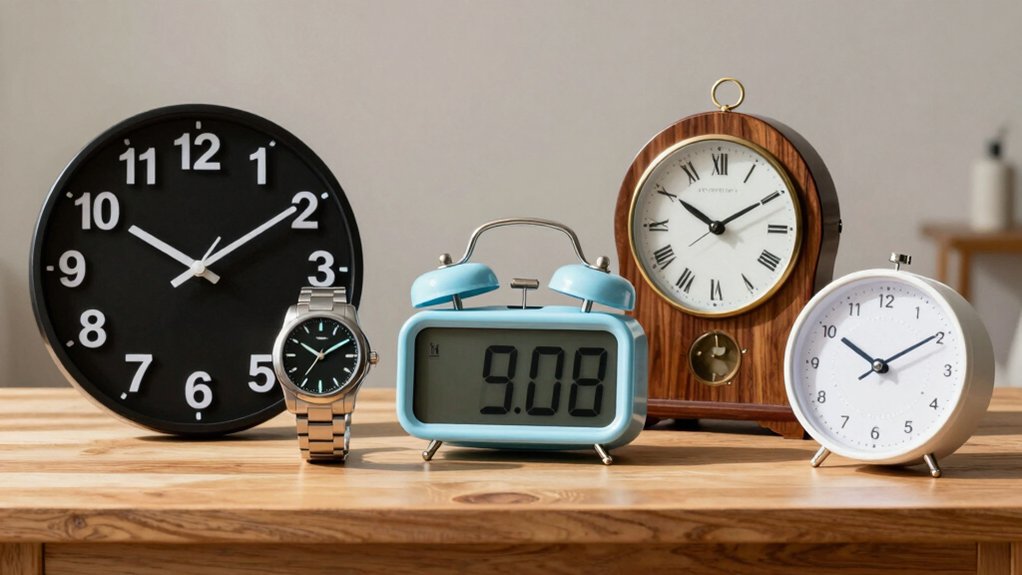
How can you tell time at a glance without squinting? Choose a clock that uses large digits with high contrast—white numbers on a dark face or the reverse—so you can read it across the room. Aim for a display at least 7–12 inches with, a 1024×600 resolution or higher; sharper characters reduce eye strain. Pick a model offering multiple modes, such as digital large‑number screens, colored backgrounds, or analog‑style faces, to match your visual preference. Make sure it features automatic brightness or at least five adjustable levels, letting you curb glare in bright or dim settings. Look for clear, legible labels for time, date, and day, plus simple navigation and instantly readable icons or reminders. This combination guarantees easy readability and confidence in daily time‑keeping.
Color Contrast Options
After securing a size and resolution that prevent squinting, the next step is to guarantee the display’s color contrast supports clear reading in any lighting. Choose clocks that pair bright digits—white or yellow—with dark faces, because the stark difference maximizes legibility for low‑vision users. Look for models that let you toggle between light‑on‑dark and dark‑on‑light modes, so you can adapt to bright rooms or dim evenings without sacrificing clarity. Diverse color themes, such as red, white, or blue backgrounds, give you extra options to reduce glare and meet personal contrast preferences. Make sure the font weight stays bold across all palettes; a thick, large type keeps numbers readable from a distance. Finally, pick a device that offers adjustable brightness and auto‑dimming to preserve optimal contrast throughout the day.
Adjustable Brightness Levels
Why settle for a single brightness setting when lighting can tailor a clock’s glow to every time of day? You’ll want a device that lets you switch among several presets—typically five levels—so you can boost visibility in a bright kitchen or dim the display for a bedroom nightstand. Look for models with auto‑dimming; they sense ambient light and adjust automatically, preventing glare while preserving readability. Higher brightness helps you read the time from across the room, which is essential if you have visual impairments. At night, a lower setting keeps the face subtle, supporting a comfortable sleep environment. A customizable range ensures you get clear daytime cues and gentle nighttime illumination, enhancing everyday usability.
Simple Button Navigation
Ever struggled with tiny, confusing controls on a clock? You’ll want a device that features clearly labeled, oversized physical buttons arranged simply—think separate up, down, and OK keys. A 4‑direction navigation pad plus a single OK or MENU button cuts the steps needed to set time, date, and alarms. Look for plain‑language labels printed on each button so you don’t have to guess their purpose or rely on a remote. Tactile feedback, distinct shapes, or textured surfaces let you feel the right control without looking. Choose models that keep menu depth shallow; essential settings should be reachable in one or two presses, not a cascade of sub‑menus. This straightforward layout reduces confusion and speeds up daily use.
Memory Backup Capability
Clear, oversized buttons make setting a clock easy, but if the power goes out, those settings can disappear. A memory backup capability prevents that loss by preserving alarms, time, and date during outages. Look for models that use built‑in battery memory or a removable AA/AAA backup battery; these keep your schedule intact until power returns. Devices with auto‑resume will instantly restore the correct time and date, so you won’t have to re‑enter information. This feature is especially valuable for seniors with memory challenges, as it maintains daily reminders without caregiver intervention. Some clocks even auto‑correct to the accurate time after a blackout, further reducing hassle. Choose a clock with reliable backup to keep routines uninterrupted.
Multi‑Language Support
How important is it that a senior can read reminders in their own language? If you choose a clock with multi‑language support, you eliminate confusion and boost independence. Look for models that cover at least eight languages—English, Spanish, German, French, Italian, Dutch, Swedish, Polish—so every household member can set alarms and read messages without translation. The device should let you switch languages through a simple on‑screen menu, avoiding the need for a phone or tech‑savvy assistant. Make sure alarm labels and reminder texts appear in the selected language; this reduces missed doses or appointments. A clear, intuitive interface ensures you can adjust settings quickly, keeping daily routines smooth and stress‑free.
Frequently Asked Questions
How Long Do the Batteries Last on These Large Print Clocks?
You’ll typically get two to five years from standard AA or AAA batteries, depending on the clock’s backlight and features; quartz models last longer, while those with LCD displays may need replacement sooner.
Are the Clocks Waterproof or Splash‑Resistant?
You’ll find most models are splash‑resistant, not fully waterproof; they handle occasional spills and light rain, but you shouldn’t submerge them. Check each product’s rating to confirm its exact protection level.
Can the Clocks Be Mounted on a Wall or Placed on a Bedside Table?
You can mount most models on a wall or set them on a bedside table; many include key‑hole brackets or rubber‑foot pads, so you’ll have flexible placement options without extra tools.
Do the Clocks Support Multiple Time Zones?
You’ll find that most models let you select several zones, and you can switch between them with a simple button press, so you’ll never miss a meeting across time zones.
Is There a Warranty or Return Policy for These Senior Clocks?
You’ll find most models include a one‑year warranty and a 30‑day return policy; just keep the receipt, contact the seller within the window, and they’ll replace or refund if anything’s defective.

Hi, my name is Eddie, I am a professional trainer specializing in the elderly population and I’m also a website designer. I love training in the gym, going to the beach, traveling, and having good food.
I combined my love for sport and website designing to make “DisabilitEase” whose purpose is to help elderly and disabled people live a more full and active life, have more fun, and enjoy their unique journey despite any disability.

Leave a Reply