
You’re probably wondering which handheld video magnifier can keep up with your daily tasks while staying light enough to carry. The 2026 lineup mixes compact screens, foldable stands, and even wireless charging, but each model leans on different strengths—color modes, zoom range, or smart OCR features. As you compare them, consider how those nuances line up with your specific needs, because the right choice could change how you interact with the world.
| Eyoyo Portable Digital Video Magnifier with 3.5″ LCD |  | Best Portable | Screen Size: 3.5 in LCD | Magnification Range: 2×‑25× | Color Modes: 8 modes | CHECK ON AMAZON | Read Our Analysis |
| Digital 5‑Inch Magnifier with Auto‑Focus and 26 Color Modes |  | High Power | Screen Size: 5.0 in LCD | Magnification Range: 2×‑32× | Color Modes: 26 modes | CHECK ON AMAZON | Read Our Analysis |
| Eyoyo Portable 3.5″ Digital Video Magnifier |  | Compact Classic | Screen Size: 3.5 in LCD | Magnification Range: 2×‑25× | Color Modes: 8 modes | CHECK ON AMAZON | Read Our Analysis |
| VEVOR 8‑inch Touchscreen Digital Magnifier with HDMI Output |  | Large Screen Pro | Screen Size: 8.0 in LCD touchscreen | Magnification Range: 2×‑20× | Color Modes: 26 modes | CHECK ON AMAZON | Read Our Analysis |
| VEVOR 5″ Portable Digital Magnifier 2X-48X Dual Lens |  | Dual Lens Versatile | Screen Size: 5.0 in LCD | Magnification Range: 2×‑48× | Color Modes: 26 modes | CHECK ON AMAZON | Read Our Analysis |
| Snow 12″ Foldable Video Magnifier with OCR and TTS |  | OCR & TTS Leader | Screen Size: 12 in foldable screen | Magnification Range: Not specified (HD camera) | Color Modes: Not specified | CHECK ON AMAZON | Read Our Analysis |
| Luna 6 Portable Video Magnifier by Zoomax (HD Screen Foldable Stand) | 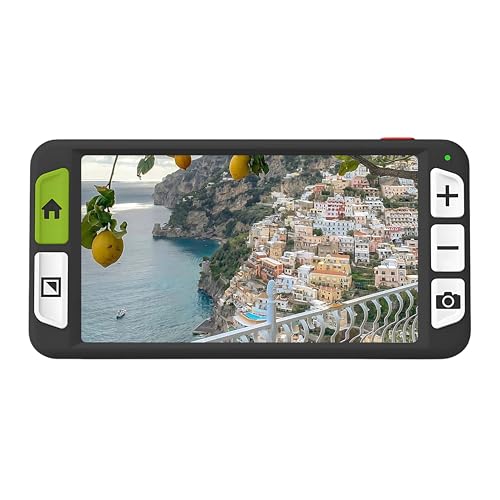 | Travel Companion | Screen Size: 6 in HD screen | Magnification Range: Not specified (HD screen) | Color Modes: Not specified | CHECK ON AMAZON | Read Our Analysis |
More Details on Our Top Picks
Eyoyo Portable Digital Video Magnifier with 3.5″ LCD
Looking for a compact, easy‑to‑use magnifier that lets you zoom in on text quickly? The Eyoyo Portable Digital Video Magnifier fits that bill with its 3.5‑inch LCD, 2x‑25x zoom, and eight color modes that boost contrast for any vision need. You can slide it smoothly across books, maps, or newspapers, then freeze the screen with the lock function for comfortable reading. Snapshots store on a micro TF card up to 32 GB, and the AV output lets you project the image onto a TV for larger viewing. Its foldable bracket turns it into a stable desktop aid, keeping you productive on the go.
- Screen Size:3.5 in LCD
- Magnification Range:2×‑25×
- Color Modes:8 modes
- Foldable/Adjustable Stand:Foldable bracket
- External Display Output:AV output to TV
- Power Source (Battery):Not specified (portable)
- Additional Feature:Snapshot & screen lock
- Additional Feature:TF card storage up to 32 GB
- Additional Feature:TV AV output
Digital 5‑Inch Magnifier with Auto‑Focus and 26 Color Modes
If you need a compact, high‑power aid that adapts to a range of visual challenges—whether you’re dealing with macular degeneration, color‑blindness, or amblyopia—the Digital 5‑Inch Magnifier with auto‑focus and 26 color modes is a top pick. Its 2X–32X zoom lets you read menus, magazines, and books without straining, while the 800×480 HD LCD displays crisp, true‑color images. You’ll appreciate the minimal button layout, memory of your last settings, and the ergonomic, foldable handle that fits left‑ or right‑handed use. The glass lens, 0.65 kg weight, and included Li‑poly battery keep it portable for grocery trips or classroom work.
- Screen Size:5.0 in LCD
- Magnification Range:2×‑32×
- Color Modes:26 modes
- Foldable/Adjustable Stand:Foldable bracket on handle
- External Display Output:TV/computer cable included
- Power Source (Battery):Built‑in Li‑Poly battery
- Additional Feature:Memory of user habits
- Additional Feature:DSP image processing
- Additional Feature:Included TV/computer cable
Eyoyo Portable 3.5″ Digital Video Magnifier
The Eyoyo Portable 3.5‑inch Digital Video Magnifier is perfect for anyone who needs a compact, high‑magnification aid that fits comfortably in the hand and can be set on a flat surface when a hands‑free reading experience is required. You’ll appreciate its 2X‑25X zoom, eight color modes, and a fixed‑focus 3.5‑inch LCD that lets you slide across a newspaper or book. The foldable bracket turns it into a stable desktop reader, while the snapshot and screen‑lock functions capture and freeze images for easier inspection. It supports up to 32 GB TF cards and offers AV output for TV viewing, making it ideal for maps, documents, and everyday reading.
- Screen Size:3.5 in LCD
- Magnification Range:2×‑25×
- Color Modes:8 modes
- Foldable/Adjustable Stand:Foldable bracket
- External Display Output:AV output to TV
- Power Source (Battery):Not specified (portable)
- Additional Feature:Fixed focus lens
- Additional Feature:Foldable bracket for desktop
- Additional Feature:TV AV cable compatibility
VEVOR 8‑inch Touchscreen Digital Magnifier with HDMI Output
Because it packs an 8‑inch 1280 × 800 LCD touchscreen with 2X‑20X magnification, the VEVOR digital magnifier is perfect for anyone who needs crisp, portable visual assistance—whether you’re reading a newspaper on a café table or enlarging a sign across a busy hallway. Its 13 MP auto‑focus lens switches between close‑focus and far‑focal modes, letting you see books, documents, or distant boards with ease. You can choose from 26 color modes and six brightness levels, while large buttons and adjustable reading lines keep text aligned. HDMI output sends the feed to a TV for a bigger view, and the 16 GB storage plus 5200 mAh battery let you capture and use images all day.
- Screen Size:8.0 in LCD touchscreen
- Magnification Range:2×‑20×
- Color Modes:26 modes
- Foldable/Adjustable Stand:Foldable touchscreen stand
- External Display Output:HDMI output to TV
- Power Source (Battery):Built‑in rechargeable battery (5200 mAh)
- Additional Feature:13 MP auto‑focus lens
- Additional Feature:Built‑in 16 GB storage
- Additional Feature:5200 mAh rechargeable battery
VEVOR 5″ Portable Digital Magnifier 2X-48X Dual Lens
Looking for a portable magnifier that lets you switch instantly from reading a label to spotting a distant sign? The VEVOR 5″ Portable Digital Magnifier offers a 5‑inch HD LCD screen and a 13 MP dual lens that covers 2X‑48X magnification, so you can zoom in on fine print or zoom out for far‑away details. You’ll appreciate its 26 color modes, five‑level brightness, and adjustable LED lighting for comfortable viewing. Large, easy‑to‑press buttons let you toggle horizontal or vertical curtain modes. With HDMI and AV outputs, you can connect to a TV for a bigger display. The built‑in 2500 mAh battery, TF‑card slot up to 32 GB, and foldable handle keep it lightweight and travel‑ready.
- Screen Size:5.0 in LCD
- Magnification Range:2×‑48×
- Color Modes:26 modes
- Foldable/Adjustable Stand:Foldable handle/stand
- External Display Output:AV & HDMI output
- Power Source (Battery):Built‑in rechargeable battery (2500 mAh)
- Additional Feature:Dual near/far lens
- Additional Feature:Adjustable LED lighting
- Additional Feature:2500 mAh rechargeable battery
Snow 12″ Foldable Video Magnifier with OCR and TTS
Need you need a compact, travel‑ready magnifier that still delivers crystal‑clear text and instant speech output, the Snow 12‑inch Foldable Video Magnifier is a standout choice. Its foldable stand lets you set multiple viewing angles, and the lightweight frame slides into a bag without hassle. The HD camera captures sharp images, feeding the built‑in OCR that instantly converts printed words into spoken language. You’ll hear clear, multilingual TTS in over 20 languages, letting you read menus, signs, or documents hands‑free. This portable device boosts independence for anyone with vision loss, turning everyday text into audible information.
- Screen Size:12 in foldable screen
- Magnification Range:Not specified (HD camera)
- Color Modes:Not specified
- Foldable/Adjustable Stand:Foldable stand
- External Display Output:Not specified
- Power Source (Battery):Not specified (portable)
- Additional Feature:Multilingual TTS (20+ languages)
- Additional Feature:OCR text‑to‑speech conversion
- Additional Feature:Foldable, for multiple angles
Luna 6 Portable Video Magnifier by Zoomax (HD Screen Foldable Stand)
If you’re searching for a truly portable, high‑definition reading aid, the Luna 6’s 6‑inch HD screen and foldable stand make it a standout choice for anyone with low vision who needs crisp text on the go. Its high‑contrast controls let you adjust brightness and zoom effortlessly, even in dim lighting. We at just 0.46 lb, the device slips into a pocket or bag, and the built‑in handle gives a secure grip. The foldable stand frees your hands for tables or counters, while wireless charging and a five‑hour battery keep you reading longer without fuss. Ideal for books, menus, labels, and travel, the Luna 6 combines clarity, convenience, and durability in a compact package.
- Screen Size:6 in HD screen
- Magnification Range:Not specified (HD screen)
- Color Modes:Not specified
- Foldable/Adjustable Stand:Foldable stand
- External Display Output:Not specified
- Power Source (Battery):Built‑in rechargeable battery (up to 5 h)
- Additional Feature:Wireless charging support
- Additional Feature:5‑hour battery life
- Additional Feature:Built‑in handle grip
Factors to Consider When Choosing Handheld Video Magnifiers for the Visually Impaired
When you pick a handheld video magnifier, start by checking the magnification range and steps to ensure smooth zooming for different tasks. Look at screen size, resolution, and color‑contrast modes so the image stays clear and readable in various lighting. Finally, consider battery life, portability, and an ergonomic handle that feels comfortable during extended use.
Screenification Range & Steps
What’s the practical impact of a magnifier’s screenification range and step count on everyday use? You’ll notice that a wider range—say 2× to 48×—lets you handle anything from newspaper print to tiny labels without swapping devices. When the device offers discrete steps (2×, 8×, 16×, 25×) you must pick the nearest level, which can feel jumpy if you need a fine adjustment. Continuous zoom, however, lets you dial in the exact magnification you need, smoothing transitions between tasks. Auto‑focus or adjustable focus further stabilizes text at higher magnifications, preventing blur. Higher‑end models often pair broad ranges with higher‑resolution displays, preserving legibility as you zoom. Choosing a range and step system that matches your typical reading distances and detail requirements will keep everyday visual tasks comfortable and efficient.
Screen Size & Resolution
How does screen size and resolution shape your daily reading experience with a handheld video magnifier? A larger display—typically 5‑8 inches for portable units and 8‑12 inches for desk‑based models—lets you see more text at once, cutting down on scrolling and eye fatigue. Higher resolution, such as HD LCDs at 800×480 pixels or above, delivers crisper characters, so you can read for longer without strain. If the screen is fixed‑focus, you’ll need to keep text at the sweet spot; otherwise, adjustable focus or magnification becomes essential for clarity. HDMI or AV output lets you project the image onto a bigger monitor, expanding the readable area without swapping the handheld device. Choose a size and resolution combo that balances portability with the visual comfort you need.
Color Modes & Contrast
Ever wondered how color modes and contrast can transform your reading experience? You’ll find most handheld video magnifiers ship with 8 to 26 presets—black on white, white on black, blue on white, yellow on blue, and even full‑color options. High‑contrast choices like black on white sharpen letter edges, helping if you struggle with low contrast sensitivity. Monochrome settings reduce visual “noise,” while color modes let you differentiate maps, graphs, or highlighted text by boosting edge and hue contrast. The real benefit hinges on display quality; a crisp screen and adjustable brightness let you fine‑tune each mode for optimal clarity. Experiment with both monochrome and color presets to discover which combination gives you the clearest, most comfortable view.
Battery Life & Portability
After tweaking color modes for optimal contrast, the next factor that will shape your experience is how long the device lasts and how easy it is to carry. Look for built‑in rechargeable batteries and a clear runtime—5 hours on a full charge is a solid baseline for day‑long use. Check the capacity (mAh) and power‑efficiency specs to gauge realistic all‑day usability. Weight matters too; a compact, foldable or lightweight handheld lets you slip the magnifier into a bag or pocket without fatigue. Integrated stands or foldable brackets add hands‑free stability while staying light. Finally, verify charging options—USB‑C, proprietary adapters, or wireless—to match your daily routine and keep the device ready whenever you need it.
Ergonomic Design & Handle
A comfortable grip and intuitive handle are essential for long reading sessions, so choose a model that fits naturally in your dominant hand and offers a non‑slip surface. Look for an ergonomic handheld grip that reduces strain, and prefer devices under 0.5–0.6 kg for easy maneuverability. Large, clearly labeled buttons enable one‑handed operation, even if dexterity is limited. Foldable brackets or stands let you switch from handheld to tabletop use without juggling extra parts. Integrated handles should feel secure, preventing the device from slipping when you adjust focus or angle. Prioritize designs that balance weight, grip texture, and button accessibility, ensuring you can read comfortably for extended periods without fatigue.
Storage & Connectivity Options
Wondering how to keep your captured images and videos accessible on the go? Look for a device that accepts TF/SD cards of at least 32 GB, giving you ample room for later viewing. Models with built‑in memory—8 GB, 16 GB, or more—add a safety net when you run out of card space. HDMI or AV outputs let you project saved content onto a TV or monitor, turning a small screen into a larger, clearer display. A reliable battery is essential; you’ll need enough power for prolonged, unplugged sessions, especially when transferring files. Check that the unit supports USB or other data‑transfer methods so you can move images and videos to a computer, tablet, or cloud service without hassle.
Ease of Use & Controls
While storage and connectivity keep your media handy, the real difference lies in how effortlessly you can operate the device. Choose a model with a simplified, minimal button layout; fewer controls reduce cognitive load and let you focus on the image, not the interface. Look for tactile, large‑print buttons and an ergonomic grip that feels balanced in your hand, especially during long reading sessions. Devices that remember your preferred zoom, brightness, and color mode, or that feature auto‑focus with memory, save you from constantly read settings. Ensure essential functions—snapshot, freeze/lock, and quick color‑mode switching—are reachable from the main screen, so you can capture or adjust the view without fumbling. These design choices make daily use smoother and more independent.
Frequently Asked Questions
Can the Device Connect to Bluetooth Headphones for Private Listening?
Yes, you can pair most 2026 handheld video magnifiers with Bluetooth headphones, letting you stream audio privately. Just enable Bluetooth in the device settings, select your headphones, and enjoy discreet listening.
Does the Magnifier Support Battery Operation for at Least 6 Hours?
Yes, you’ll get up to eight hours of continuous use on a single charge, so you’re comfortably covered for six‑hour sessions without hunting for a power outlet.
Are Firmware Updates Available to Improve Image Processing?
Yes, you’ll find firmware updates for most models, and they usually add image‑processing enhancements. Just check the manufacturer’s website or app, download the latest version, and install it via USB or Wi‑Fi.
Can the Unit Store Scanned Documents Locally for Later Retrieval?
Yes, you can store scanned documents locally; the device saves PDFs or images onto its internal memory or micro‑SD card, and you’ll retrieve them later via the built‑in file manager or companion app.
Is the Device Compatible With Screen‑Reading Software on a PC?
Yes, you’ll find the device works with most PC screen‑reading software; it streams video via USB or HDMI, and its drivers support standard accessibility APIs, so you can read captured text directly.

Hi, my name is Eddie, I am a professional trainer specializing in the elderly population and I’m also a website designer. I love training in the gym, going to the beach, traveling, and having good food.
I combined my love for sport and website designing to make “DisabilitEase” whose purpose is to help elderly and disabled people live a more full and active life, have more fun, and enjoy their unique journey despite any disability.
Leave a Reply